
11. Device Tree and Device Tree Plugins
Video introduction to this chapter:

“19-LubanCat update kernel and device tree”
https://www.bilibili.com/video/BV1zc411A7Me/
“27-Device Tree and Device Tree Plugin”
https://www.bilibili.com/video/BV1XV4y1U7V1/
11.1. Device tree
The Linux kernel introduced the concept of device tree from 3.x to realize the separation of driver code and device information. The device tree is used to describe the hardware resources of a hardware platform. This “device tree” can be passed to the kernel by the bootloader (uboot). The kernel can obtain hardware information from the device tree. It is equivalent to using a customized device tree to operate different hardware resources. For example, interfaces such as i2c, spi, mipi, mini-pcie, and i2s can only be operated normally by configuring and enabling them through the device tree.
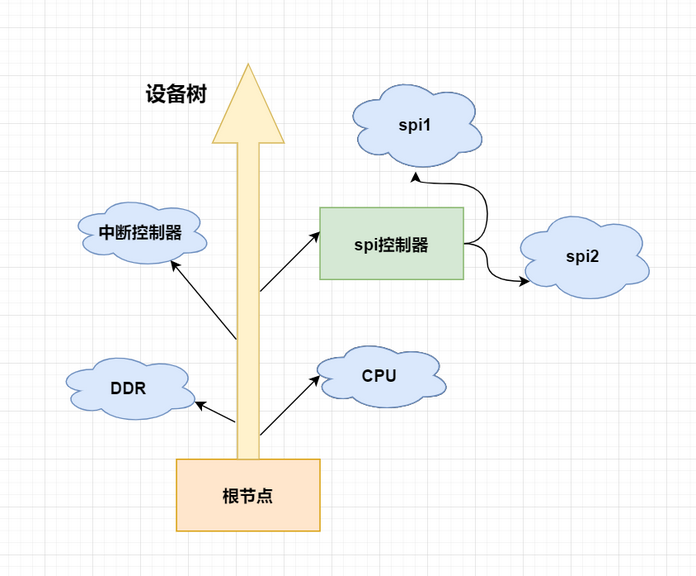
The device tree describes hardware resources in a “tree-like” structure. For example, the local bus is the “trunk” of the tree, which is called the “root node” in the device tree. The spi bus mounted to the local bus is the “branch” of the tree, which is called “the child node of the root node” in the device tree. There is more than one spi device under the spi bus, and these “branches” can be further divided.
警告
The use of the following device tree and device tree plugins is only applicable to Ubuntu images using extboot partitions. Other system images cannot switch between the main device tree and device tree plugins. For details, please refer to Device tree compilation
11.1.1. Using the device tree
In the LubanCat-RK series of boards, each board has many main device trees, located in /boot/dtb.
Since our general image needs to support many different boards, we change the device tree by reading the device id at startup to adapt to different boards.
The device tree of LubanCat-RK series boards is specified by a file, which is /boot/rk-kernel.dtb, as shown below:
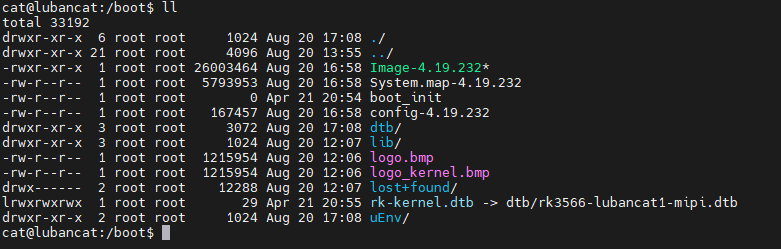
rk-kernel.dtb is linked to the rk3566-lubancat1-mipi.dtb device tree through a soft link, So now I can turn on the screen.
If you want to use another main device tree, you can use the following command.
1 2 3 4 5 | #Enter the /boot directory
cd /boot
#Switch on the HDMI mode, close the device tree of the mipi screen.
ln -sf dtb/rk3566-lubancat1.dtb rk-kernel.dtb
|
注意
When using the ln command, be sure to use a relative path, not an absolute path.
11.2. Device Tree Plugin
The dynamic device tree (Dynamic DeviceTree) was introduced after Linux4.4. The device tree plug-in can be understood as a “patch” of the main device tree, which is dynamically loaded into the system and recognized by the kernel.
We can understand the device tree plug-in in this way: the main device tree is a big tree, and the device tree plug-in is equivalent to a gardener. Gardeners can not only prune branches and leaves, but also carry out harvesting operations for large trees.
Pruning: disable and enable some unnecessary devices.
Grafting: add new things to the main device, for example: create a new device node.
11.2.1. Use of the device tree plugin
The device tree plugin for LubanCat-RK series boards is located in /boot/dtb/overlay
1 2 3 4 5 6 7 8 9 10 11 12 13 | cat@lubancat:/boot/dtb/overlay$ ls
README.rockchip-overlays.md lubancat-pwm8-m0-overlay.dtbo
lubancat-dsi0-mipi-display-overlay.dtbo lubancat-pwm9-m0-overlay.dtbo
lubancat-gmac1-disable-overlay.dtbo lubancat-spi3-m1-gpio-cs-overlay.dtbo
lubancat-i2c3-m0-overlay.dtbo lubancat-spi3-m1-overlay.dtbo
lubancat-i2c5-m0-overlay.dtbo lubancat-uart3-m0-overlay.dtbo
lubancat-pwm10-m0-overlay.dtbo lubancat-uart3-m1-overlay.dtbo
lubancat-pwm11-ir-m0-overlay.dtbo lubancat-uart8-m0-overlay.dtbo
lubancat-pwm14-m0-overlay.dtbo rockchip-fixup.scr
lubancat-pwm3-ir-overlay.dtbo
cat@lubancat:/boot/dtb/overlay$
#A collection of device tree plugins for all boards of the LubanCat-RK series.
|
The way to configure the device tree plug-in is to modify the configuration file of the device tree plug-in, which is located in /boot/uEnv.
Since there are many types of boards in the LubanCat-RK series, our configuration files are named after the board models.
1 2 3 4 5 6 7 | cat@lubancat:/boot/uEnv$ ls
uEnv.txt uEnvLubanCat1N.txt uEnvLubanCat2N.txt uEnvLubanCatZW.txt
uEnvLubanCat1.txt uEnvLubanCat2.txt uEnvLubanCat2-V1.txt uEnvLubanCatZN.txt
cat@lubancat:/boot/uEnv$
#uEnvLubanCat1.txt "Boards compatible with LubanCat1"
|
注意
Since the LubanCat2 board ushered in a revision, the configuration file of the new version of the LubanCat2 board will be renamed uEnvLubanCat2-V1.txt, please pay attention to friends who use the new version of the LubanCat2 board.
LubanCat-2-V1 is a modified version of LubanCat-2, which modifies a 40pin gpio and adds sleep wake-up function.
To identify LubanCat-2-V1, check the silkscreen on the back of the board.
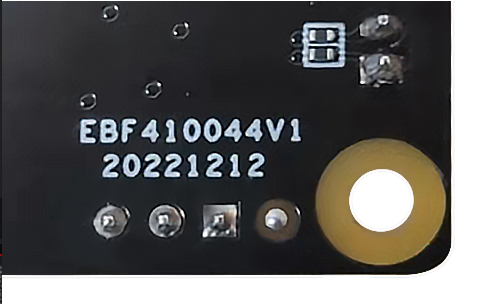
If it is EBF410044V1, it is the V1 version.
11.2.1.1. Modify the configuration file
1 2 3 4 5 6 7 8 9 10 11 12 13 14 15 16 17 18 19 20 21 22 23 24 25 26 27 28 29 30 31 32 33 34 35 36 37 38 39 40 41 42 43 44 45 46 | #Open your board's configuration file
sudo vi /boot/uEnv/uEnvBoard.txt
#The following is the content of the vim open configuration file
uname_r=4.19.232
size=0x1000000
bootargs=console=ttyFIQ0 console=tty1
#dtb=rk3566-lubancat1.dtb
enable_uboot_overlays=1
#overlay_start
#40pin
#dtoverlay=/dtb/overlay/rk356x-lubancat-i2c3-m0-overlay.dtbo
#dtoverlay=/dtb/overlay/rk356x-lubancat-i2c5-m0-overlay.dtbo
#dtoverlay=/dtb/overlay/rk356x-lubancat-pwm8-m0-overlay.dtbo
#dtoverlay=/dtb/overlay/rk356x-lubancat-pwm9-m0-overlay.dtbo
#dtoverlay=/dtb/overlay/rk356x-lubancat-pwm10-m0-overlay.dtbo
#dtoverlay=/dtb/overlay/rk356x-lubancat-pwm11-ir-m0-overlay.dtbo
#dtoverlay=/dtb/overlay/rk356x-lubancat-pwm12-m0-overlay.dtbo
#dtoverlay=/dtb/overlay/rk356x-lubancat-pwm13-m0-overlay.dtbo
#dtoverlay=/dtb/overlay/rk356x-lubancat-pwm13-m1-overlay.dtbo
#dtoverlay=/dtb/overlay/rk356x-lubancat-pwm14-m0-overlay.dtbo
#dtoverlay=/dtb/overlay/rk356x-lubancat-pwm14-m1-overlay.dtbo
#dtoverlay=/dtb/overlay/rk356x-lubancat-pwm15-ir-m0-overlay.dtbo
#dtoverlay=/dtb/overlay/rk356x-lubancat-pwm15-ir-m1-overlay.dtbo
#dtoverlay=/dtb/overlay/rk356x-lubancat-spi3-m1-gpio-cs-overlay.dtbo
#dtoverlay=/dtb/overlay/rk356x-lubancat-spi3-m1-overlay.dtbo
#dtoverlay=/dtb/overlay/rk356x-lubancat-uart3-m0-overlay.dtbo
#dtoverlay=/dtb/overlay/rk356x-lubancat-uart3-m1-overlay.dtbo
#dtoverlay=/dtb/overlay/rk356x-lubancat-uart4-m1-overlay.dtbo
#dtoverlay=/dtb/overlay/rk356x-lubancat-uart5-m1-overlay.dtbo
#dtoverlay=/dtb/overlay/rk356x-lubancat-uart7-m1-overlay.dtbo
#dtoverlay=/dtb/overlay/rk356x-lubancat-uart9-m1-overlay.dtbo
#mini-pcie 5G modules
#dtoverlay=/dtb/overlay/rk356x-lubancat-pcie2x1-disable-overlay.dtbo
#display
#dtoverlay=/dtb/overlay/rk3566-lubancat-dsi0-720p-overlay.dtbo
#dtoverlay=/dtb/overlay/rk3566-lubancat-dsi0-1080p-overlay.dtbo
#dtoverlay=/dtb/overlay/rk3566-lubancat-dsi0-rpi-overlay.dtbo
#overlay_end
~
~
~
"uEnvLubanCat1.txt" [readonly] 19L, 610C 1,1 All
|
The way to open the device tree plug-in is to delete the comment of the corresponding device tree plug-in, that is, delete ‘#’
The way to close the device tree plug-in is to comment out the corresponding device tree plug-in, that is, add ‘#’ at the beginning of the line
For more information about the device tree and the device tree plug-in, you can visit the LubanCat-RK series system construction manual