
29. ADC#
目前硬件上引出ADC的有以下板卡:
LubanCat-3金手指/BTB底板(含有ADC*4)
警告
ADC只支持0~1.8V电压采集,不能超压!
LubanCat-3金手指/BTB底板接口定义如下:
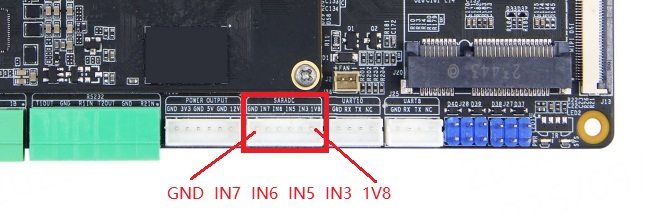
29.1. 接口说明#
ADC属于IIO子系统,IIO提供了一个统一的接口来管理不同类型的传感器和数据采集设备,从而方便了数据的获取和处理。
ADC相应接口在/sys/bus/iio/devices/目录下,以鲁班猫3IO为例,系统中只有ADC一个IIO设备,注册为iio:device0,如果存在多个IIO设备那么ADC对应的设备号可能不一样,以实际为准。
1#查看iio:device0目录
2ls /sys/bus/iio/devices/iio:device0
3
4#信息输出如下
5buffer           in_voltage2_raw  in_voltage7_raw   scan_elements
6buffer0          in_voltage3_raw  in_voltage_scale  subsystem
7dev              in_voltage4_raw  name              trigger
8in_voltage0_raw  in_voltage5_raw  of_node           uevent
9in_voltage1_raw  in_voltage6_raw  power             waiting_for_supplier
该目录下文件数目很多,但我们主要关注in_voltagex_raw、in_voltage_scale这两个文件即可, 其中in_voltageX_raw为对应adc通道的adc数据的原始数值,in_voltage_scale为adc数据与电压值换算比例, 将从这两个读取到的数据相乘即可得到我们想要的板载电位器上的电压值。
29.2. 使用shell脚本读取#
由于读取电压值相对简单,以下将编写简单的shell脚本获取 iio:device0 的 IN5通道 的电压值。
 1#!/bin/bash
 2
 3echo "Press Ctrl+C to quit"
 4
 5while true
 6do
 7    vol_raw=$(cat /sys/bus/iio/devices/iio:device0/in_voltage5_raw)
 8    vol_scale=$(cat /sys/bus/iio/devices/iio:device0/in_voltage_scale)
 9    vol=$(echo "scale=4; $vol_raw * $vol_scale / 1000" | bc)
10    formatted_vol=$(printf "%.4f" $vol)
11    echo "vol_raw:$vol_raw, vol_scale:$vol_scale, vol:$formatted_vol V"
12    sleep 1s
13done
执行shell脚本后,每秒将输出in_voltage5_raw的原始值、in_voltage_scale数据与电压值换算比例以及转换后的电压值。
29.3. 使用C程序读取#
由于读取电压值相对简单,以下将编写C程序获取 IN5通道 的电压值。
 1#include <stdio.h>
 2#include <stdlib.h>
 3#include <unistd.h>
 4
 5#define RAW_PATH "/sys/bus/iio/devices/iio:device0/in_voltage5_raw"
 6#define SCALE_PATH "/sys/bus/iio/devices/iio:device0/in_voltage_scale"
 7
 8int main(void)
 9{
10    FILE *raw_file, *scale_file;
11    int raw_value;
12    float scale_value, voltage;
13
14    while (1) {
15        // 打开文件
16        raw_file = fopen(RAW_PATH, "r");
17        if (raw_file == NULL) {
18            perror("Error opening raw file");
19            return EXIT_FAILURE;
20        }
21
22        scale_file = fopen(SCALE_PATH, "r");
23        if (scale_file == NULL) {
24            perror("Error opening scale file");
25            fclose(raw_file);
26            return EXIT_FAILURE;
27        }
28
29        // 读取原始值
30        if (fscanf(raw_file, "%d", &raw_value) != 1) {
31            perror("Error reading raw value");
32            fclose(raw_file);
33            fclose(scale_file);
34            return EXIT_FAILURE;
35        }
36
37        // 读取比例因子
38        if (fscanf(scale_file, "%f", &scale_value) != 1) {
39            perror("Error reading scale value");
40            fclose(raw_file);
41            fclose(scale_file);
42            return EXIT_FAILURE;
43        }
44
45        // 计算电压
46        voltage = raw_value * scale_value;
47
48        // 输出电压值
49        printf("Voltage: %.3f mV\n", voltage);
50
51        // 关闭文件
52        fclose(raw_file);
53        fclose(scale_file);
54
55        // 延时1秒
56        sleep(1);
57    }
58
59    return EXIT_SUCCESS;
60}
编译并执行以上C程序后,每秒将输出转换后的电压值,单位mV。